.webp)
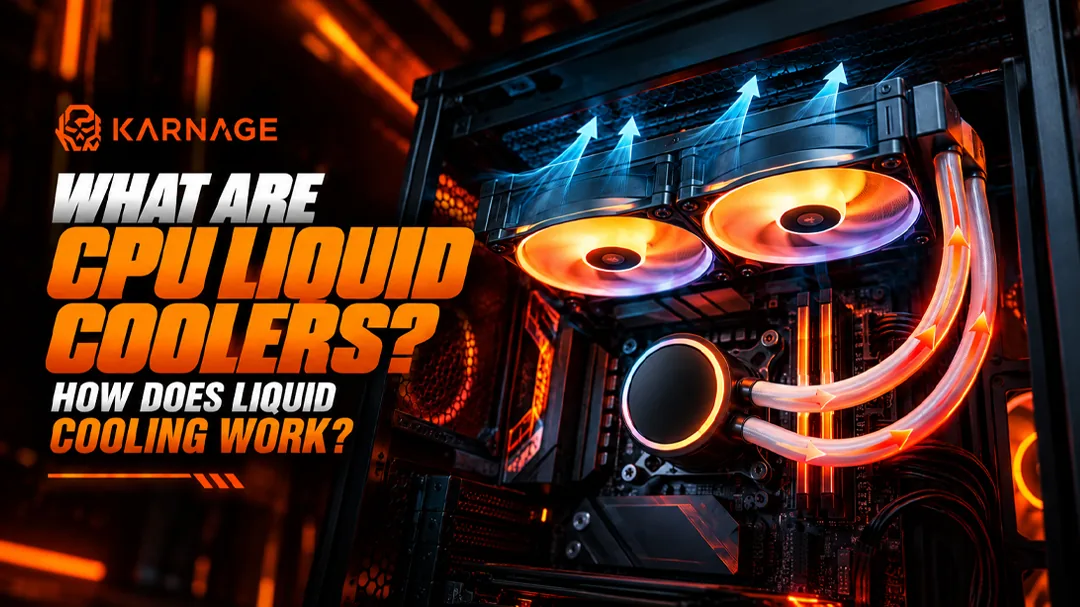
Table of Contents
- What Are CPU Liquid Coolers?
- How Does Liquid Cooling for PC Work?
- What Are the Main Parts of a Liquid Cooler?
- What Is an AIO Liquid Cooler?
- 120mm vs 240mm vs 280mm vs 360mm AIO
- What Is a Custom Liquid Cooling Loop?
- CPU Liquid Coolers vs Air Coolers
- Advantages of CPU Liquid Coolers
- Does Liquid Cooling Make Your PC Faster?
- Does Liquid Cooling Reduce CPU Temperature?
- Is Liquid Cooling Necessary for Gaming?
- How to Choose the Right CPU Liquid Cooler
- How to Install an AIO Liquid Cooler
- How to Maintain a Liquid Cooling System
- Common Mistakes When Using Liquid Cooling
- Is Liquid Cooling Worth It?
- Final Thoughts
- Frequently Asked Questions (FAQs)
If you're building a gaming PC, workstation, or high-performance computer, you've probably come across CPU liquid coolers. Unlike traditional air coolers that use a heatsink and fan to move heat away from the processor, liquid cooling uses a combination of coolant, a pump, radiator, fans, and a cold plate to transfer heat away from the CPU.
As modern processors become more powerful, managing CPU temperatures has become increasingly important. A good cooling solution can help maintain stable performance, reduce thermal throttling, and keep your system running comfortably during demanding workloads.
But how exactly does liquid cooling for PC systems work? Are liquid coolers better than air coolers? What is the difference between an AIO cooler and a custom loop? And does every gaming PC need liquid cooling?
In this guide, we'll explain everything you need to know about CPU liquid coolers, how they work, their advantages and disadvantages, and how to choose the right PC cooling system for your build.
What Are CPU Liquid Coolers?
CPU liquid coolers are cooling systems designed to remove heat from a computer's processor using a liquid coolant. Instead of relying entirely on a large metal heatsink to absorb and dissipate CPU heat, a liquid cooler transfers heat from the processor into a coolant. The heated liquid then travels to a radiator, where fans remove the heat before the cooled liquid returns to the CPU block.
Most consumer liquid coolers use a closed-loop design. These are commonly called AIO liquid coolers, or All-In-One liquid coolers, because the pump, tubing, radiator, and cold plate come as a preassembled unit. The basic components of a liquid cooling system include a CPU cold plate, pump, tubing, coolant, radiator, and fans. Together, these components form a continuous heat-transfer system.
How Does Liquid Cooling for PC Work?
Understanding liquid cooling for PC systems becomes much easier when you follow the path of heat through the cooler.
The process generally starts at the CPU. When your processor performs demanding tasks such as gaming, video rendering, 3D modeling, or compiling software, it generates heat. The CPU's integrated heat spreader transfers this heat to the cold plate attached to it.
The coolant flowing through the cold plate absorbs this heat. A pump then pushes the warmed coolant through the tubing toward the radiator.
Once the heated coolant reaches the radiator, the radiator's metal fins provide a large surface area for transferring heat into the surrounding air. Fans mounted on the radiator move air through those fins and carry the heat away from the radiator. The now-cooler liquid travels back toward the CPU block, where the cycle begins again. This process happens continuously while the computer is running.
The Basic Cooling Cycle
CPU generates heat → Cold plate absorbs heat → Coolant carries heat → Radiator releases heat → Fans move heat into the air → Coolant returns to CPU.
This continuous process is what makes liquid cooling for PC systems effective for handling sustained CPU workloads.
What Are the Main Parts of a Liquid Cooler?
A typical set of CPU liquid coolers contains several important components. Understanding what each part does can help you choose the right cooler for your computer.
CPU Cold Plate
The cold plate is the part that sits directly against the CPU. It is generally made from a thermally conductive material, such as copper, to transfer heat from the processor into the coolant. Thermal paste is normally applied between the CPU and cold plate to fill microscopic gaps between the surfaces and improve thermal conductivity.
Pump
The pump circulates coolant through the cooling loop. Without the pump, the coolant wouldn't move effectively between the CPU block and radiator. In most AIO coolers, the pump is integrated into the CPU block assembly. Pump speed can vary depending on the cooler and motherboard or software configuration.
Tubing
Tubing connects the CPU block to the radiator and allows coolant to circulate through the system. AIO coolers typically come with preinstalled flexible tubing, meaning users don't need to manually fill or assemble the cooling loop.
Radiator
The radiator is responsible for releasing heat from the coolant. It contains many small fins and channels that increase the surface area available for heat transfer. Fans push air through these fins, allowing heat from the coolant to escape into the surrounding air. Radiator size is commonly described using measurements such as 120mm, 240mm, 280mm, or 360mm.
Radiator Fans
Radiator fans move air through the radiator. The fans play an important role because the radiator itself doesn't simply eliminate heat. Instead, it transfers heat from the coolant to the radiator fins, and airflow carries that heat away. Pairing quality high-static-pressure fans like our Karnage case fans ensures strong airflow across dense fins.
Coolant
The liquid inside the cooling loop absorbs and transports heat. In a sealed AIO cooler, the coolant is already filled at the factory with anti-corrosion and anti-bacterial additives, so users generally don't need to refill it during normal operation.
What Is an AIO Liquid Cooler?
An AIO, or All-In-One, liquid cooler is a preassembled liquid cooling system designed to make liquid cooling for PC systems easier to install.
Unlike custom water-cooling loops, an AIO doesn't require you to select and connect individual components or manually fill the loop. A typical AIO includes the CPU block and pump, radiator, tubing, fans, and coolant.
This makes AIO coolers popular among gaming PC builders who want the characteristics of liquid cooling without the complexity of designing a custom loop.
120mm vs 240mm vs 280mm vs 360mm AIO
AIO coolers are available in different radiator sizes:
- 120mm AIO: Compact and can fit into smaller Mini-ITX systems, although its cooling capacity is generally more limited.
- 240mm AIO: Uses two 120mm fans and provides considerably more radiator surface area, fitting comfortably in mid-tower gaming cabinets.
- 280mm AIO: Normally uses two 140mm fans, giving it another option for systems with sufficient case width.
- 360mm AIO: Typically uses three 120mm fans and is commonly selected for high-performance CPUs and systems where maximum cooling capacity and overclocking headroom are desired.
The right size depends on your CPU, case compatibility, workload, noise preferences, and budget.
What Is a Custom Liquid Cooling Loop?
A custom loop is a more advanced form of liquid cooling for PC systems. Instead of purchasing a sealed, preassembled AIO, you select individual components and build the loop yourself.
A custom loop may include a CPU water block, reservoir, pump, radiator, fittings, tubing, and coolant. Some advanced systems can also cool the graphics card using a GPU water block. Custom loops can provide extensive cooling and customization options, but they require considerably more planning, installation effort, maintenance, and cost than an AIO. For most users, especially beginners, an AIO or high-quality air cooler is much simpler.
CPU Liquid Coolers vs Air Coolers
One of the biggest questions when building a PC is whether you should choose CPU liquid coolers or an air cooler. Air coolers use a metal heatsink and one or more fans. Heat travels from the CPU into the heatsink through a base and heat pipes. The fans then move air through the heatsink fins. Liquid coolers use coolant to transport heat from the CPU to a radiator. Neither technology is automatically the right choice for every PC.
Air Cooling
Air cooling is relatively simple because it has fewer moving parts. A good air cooler can provide strong cooling performance without requiring a pump or liquid loop. Air coolers are also often easier to install and maintain.
Liquid Cooling
Liquid cooling can move heat away from the CPU to a radiator positioned elsewhere in the case. This provides greater flexibility in how heat is dissipated. Large radiator configurations can also provide substantial cooling capacity for high-performance processors. The decision should therefore be based on your CPU, case, workload, budget, noise requirements, aesthetics, and installation preferences.
Advantages of CPU Liquid Coolers
There are several reasons why gamers and PC enthusiasts choose CPU liquid coolers:
- Efficient Heat Transfer: Liquid can transport heat efficiently from the CPU block to the radiator, dissipating heat through a larger radiator surface.
- Useful for High-Performance CPUs: High-performance processors can generate significant heat. A suitably sized AIO can provide the cooling capacity needed for sustained gaming and rendering.
- Flexible Radiator Placement: Depending on the case, radiators may be installed at the front, top, side, or rear.
- Cleaner CPU Area: An AIO doesn't require a large tower heatsink surrounding the CPU socket, giving unobstructed access to RAM modules and motherboard slots.
- Aesthetic Options: Modern AIO coolers feature vibrant ARGB lighting, illuminated pump blocks, and customizable displays.
Does Liquid Cooling Make Your PC Faster?
This is a common misconception about liquid cooling for PC systems. Installing a liquid cooler does not automatically increase your CPU's processing power. Instead, cooling helps the processor maintain appropriate operating temperatures.
If your CPU was already running at normal temperatures with an adequate air cooler, replacing it with a liquid cooler may not produce a major performance increase. However, better cooling becomes important when a processor operates under sustained heavy workloads or when thermal limits would otherwise force it to throttle clock speeds.
Does Liquid Cooling Reduce CPU Temperature?
A properly installed liquid cooler can reduce CPU temperatures compared with an inadequate cooling solution, but the exact difference depends on the CPU, cooler, case airflow, ambient temperature, fan speeds, and workload. A larger radiator doesn't automatically guarantee a specific temperature if case ventilation is poor. Make sure your gaming cabinet has ample ventilation and balanced intake/exhaust fans.
Is Liquid Cooling Necessary for Gaming?
For most gaming PCs, liquid cooling is not strictly necessary. Many gaming systems can run perfectly well using a capable air cooler. Whether you need liquid cooling depends on your processor and workload.
If you're using a mainstream CPU for regular gaming, a good air cooler may be enough. If you're using a high-end processor, running demanding workloads for long periods, or simply prefer the sleek design and low noise profile of an AIO, liquid cooling is well worth considering.
How to Choose the Right CPU Liquid Cooler
When choosing between different CPU liquid coolers, consider:
- CPU Socket & Compatibility: Ensure bracket support for Intel LGA1700/1851 or AMD AM5/AM4.
- Cabinet Clearance: Check whether your PC case supports 240mm or 360mm radiators at the top or front.
- Radiator Thickness & Fan Noise: Balance cooling performance with fan noise levels.
- Aesthetics: Match the pump block design and lighting to the rest of your build.
How to Install an AIO Liquid Cooler
The installation process varies slightly by model, but generally involves:
- Mount the backplate and standoffs onto the motherboard socket.
- Apply thermal paste if not pre-applied to the cold plate.
- Secure the pump head over the CPU in a cross pattern for even pressure.
- Mount the radiator and fans to the case (top exhaust or front intake).
- Connect pump power to the AIO_PUMP or CPU_FAN header and RGB cables to 5V ARGB headers.
How to Maintain a Liquid Cooling System
AIO CPU liquid coolers require relatively little maintenance because the loop is sealed. However, the radiator fins and fans still collect dust over time. Periodic dusting with compressed air keeps airflow optimal. Check our guide on how to clean your gaming PC for step-by-step cleaning instructions.
Common Mistakes When Using Liquid Cooling
- Mounting Radiator Incorrectly: Avoid mounting the radiator at the very bottom of the case with the pump at the highest point, as trapped air bubbles can cause pump noise and wear.
- Ignoring Fan Direction: Ensure fans blow through the radiator in harmony with overall case airflow.
- Forgetting Thermal Paste Plastic Film: Always remove the peel-off plastic cover on the cold plate before mounting!
Is Liquid Cooling Worth It?
Whether liquid cooling for PC systems is worth the investment depends on your particular build. For a budget gaming PC, a capable air cooler may offer excellent value. For a high-performance gaming PC or workstation, an AIO provides additional cooling capacity, cleaner internal aesthetics, and lower burst temperatures.
Final Thoughts
CPU liquid coolers have become a popular choice for gaming PCs and high-performance computers because they provide an effective way to transfer heat away from the processor. The basic principle is straightforward: coolant absorbs heat from the CPU, carries it to a radiator, and the radiator releases that heat into the surrounding air through its fins and fans.
Frequently Asked Questions (FAQs)
1. What are CPU liquid coolers?
CPU liquid coolers are cooling solutions that use a liquid coolant to transfer heat away from a processor. The coolant carries heat from the CPU block to a radiator, where fans dissipate that heat into the surrounding air.
2. How does liquid cooling for PC work?
Liquid cooling for PC works by circulating coolant between the CPU block and radiator. The coolant absorbs heat from the processor, travels to the radiator, releases the heat through the radiator fins, and then returns to the CPU block.
3. Is liquid cooling better than air cooling?
Neither is universally better. A suitable air cooler can provide excellent performance for many CPUs, while liquid cooling can offer additional cooling capacity and flexibility for certain high-performance systems.
4. Is liquid cooling necessary for a gaming PC?
No. A gaming PC doesn't automatically need liquid cooling. Many systems can operate effectively with a good air cooler. Liquid cooling becomes more relevant depending on the CPU, workload, case, noise preferences, and aesthetic requirements.
5. What is an AIO liquid cooler?
An AIO, or All-In-One liquid cooler, is a preassembled cooling system containing the CPU block, pump, tubing, radiator, fans, and coolant. It is designed to provide the benefits of liquid cooling without requiring users to build a custom loop.