.webp)
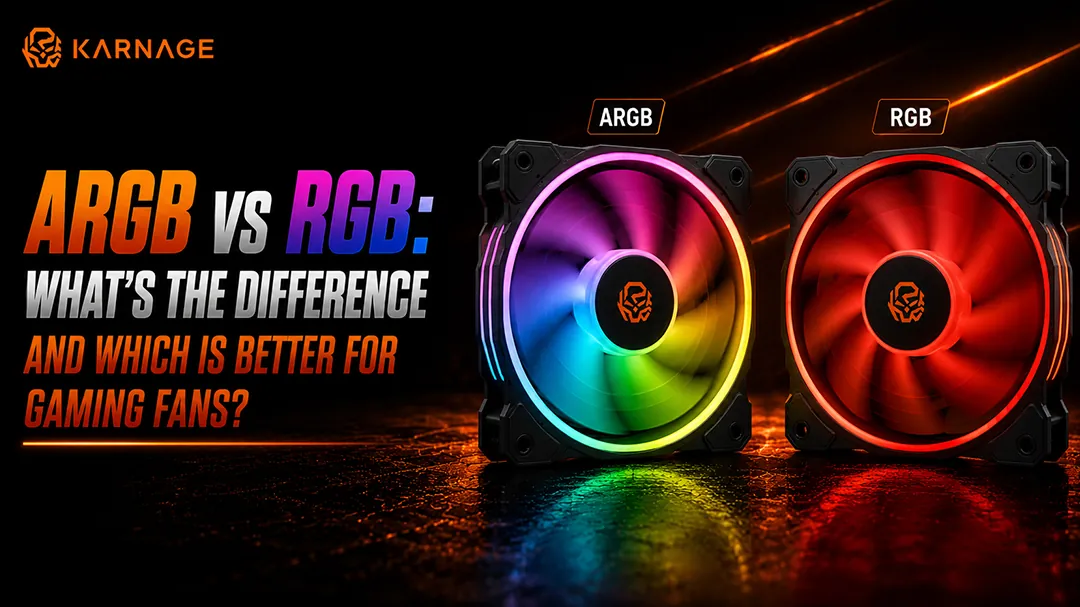
If you're building or upgrading a gaming PC, you've probably come across ARGB vs RGB while choosing case fans, CPU coolers, RAM, keyboards, and other gaming components. Although both RGB and ARGB lighting can make a gaming setup look more attractive, they work differently and offer different levels of lighting control. The biggest difference between RGB vs ARGB fans is how their LEDs are controlled. Standard RGB lighting generally controls all LEDs together, while ARGB allows individual LEDs to display different colours and effects at the same time. This difference becomes important when choosing gaming fans because compatibility, connectors, voltage, lighting control, and motherboard support all need to be considered.
In this guide, we'll explain ARGB vs RGB, how RGB vs ARGB fans work, their connector differences, cooling performance, power consumption, pricing, compatibility, and which option makes more sense for your gaming PC.
Table of Contents
- What Is RGB?
- What Is ARGB?
- ARGB vs RGB: The Main Difference
- RGB vs ARGB Fans: What's the Difference?
- Does ARGB Improve Cooling?
- RGB vs ARGB Fans: Which Looks Better?
- RGB and ARGB Connectors: Why They Matter
- Why You Shouldn't Connect 5V ARGB to a 12V RGB Header
- How RGB Fans Work
- How ARGB Fans Work
- Can RGB and ARGB Be Used Together?
- Is ARGB More Expensive Than RGB?
- Does ARGB Use More Power Than RGB?
- Which Is Better for Gaming: RGB or ARGB?
- ARGB vs RGB for a Budget Gaming PC
- ARGB vs RGB for a High-End Gaming PC
- How to Choose Between RGB and ARGB Fans
- Common RGB and ARGB Mistakes to Avoid
- Final Thoughts: ARGB vs RGB
- Frequently Asked Questions
What Is RGB?
RGB stands for Red, Green, and Blue. RGB lighting combines these three primary colours at different intensities to create a wide range of colours.
In a standard RGB fan, multiple LEDs are generally connected to the same lighting channel. This means the LEDs typically display the same colour or lighting effect at the same time.
For example, if you select blue through your motherboard software, the LEDs on an RGB fan will generally illuminate blue together.
RGB has been widely used in gaming PCs because it provides attractive lighting while remaining relatively simple to install and control.
Standard RGB systems commonly use a 12V 4-pin RGB connector. The four pins are typically used for:
- 12V power
- Red
- Green
- Blue
Because of this voltage difference, connector compatibility is extremely important when comparing ARGB vs RGB.
What Is ARGB?
ARGB stands for Addressable RGB.
Unlike standard RGB, ARGB allows individual LEDs to be controlled separately. This means different LEDs on the same fan can display different colours simultaneously.
For example, one part of an ARGB fan can display blue while another section displays purple, red, or green.
This enables advanced lighting effects such as:
- Rainbow effects
- Wave animations
- Colour cycling
- Sequential lighting
- Individual LED effects
- Custom patterns
ARGB typically uses a 5V 3-pin connector. The three connections generally provide:
- 5V power
- Data
- Ground
This is one of the most important differences to remember when comparing ARGB vs RGB.
ARGB vs RGB: The Main Difference
The easiest way to understand ARGB vs RGB is to look at how the LEDs are controlled.
In simple terms, RGB controls the lighting as a group, while ARGB gives you more control over individual LEDs.
RGB vs ARGB Fans: What's the Difference?
The difference becomes particularly noticeable when comparing RGB vs ARGB fans.
An RGB fan can provide static colours and various basic lighting modes. However, the LEDs generally change together. An ARGB fan can create more complex animations because each LED can be addressed individually.
For example, imagine a fan with 20 LEDs. With standard RGB, you might set all 20 LEDs to blue. With ARGB, you could have a gradual rainbow effect moving around the fan because different LEDs can display different colours.
Therefore, when comparing RGB vs ARGB fans, ARGB generally provides greater lighting customisation. However, lighting technology does not automatically make one fan better at cooling.
Does ARGB Improve Cooling?
No. ARGB vs RGB is primarily a lighting comparison, not a cooling-performance comparison.
An ARGB fan does not automatically cool your PC better than an RGB fan simply because it uses addressable lighting.
Cooling performance depends more on factors such as:
- Fan size
- Fan speed (RPM)
- Airflow (CFM)
- Static pressure
- Blade design
- Motor quality
- Bearing type
- Radiator compatibility
- Case airflow
For example, a well-designed RGB fan can provide better airflow than a poorly designed ARGB fan. When comparing RGB vs ARGB fans, always look at the fan's actual cooling specifications instead of choosing based only on lighting. Check out our high-airflow case fans for optimal performance.
RGB vs ARGB Fans: Which Looks Better?
This depends on your personal preference.
RGB fans can look clean and simple, particularly when you want your entire setup to use one colour. ARGB fans are generally better for users who want dynamic lighting effects.
With ARGB, you can create:
- Rainbow patterns
- Rotating colours
- Moving effects
- Multi-colour waves
- Custom lighting zones
Therefore, if lighting customisation is important to you, ARGB usually offers more flexibility. For a minimal gaming setup, standard RGB can still provide a clean and attractive appearance.
RGB and ARGB Connectors: Why They Matter
Connector compatibility is one of the most important parts of the ARGB vs RGB comparison.
Standard RGB commonly uses a 12V 4-pin connector, while ARGB commonly uses a 5V 3-pin connector. These connectors are not interchangeable.
Before purchasing RGB or ARGB fans, check your motherboard specifications and identify which lighting headers are available. Look for labels such as:
- RGB_HEADER
- 12V RGB
- 5V ARGB
- ADD_HEADER
- D_LED
- Addressable Header
The exact name depends on the motherboard manufacturer.
Why You Shouldn't Connect 5V ARGB to a 12V RGB Header
This is one of the most important safety considerations when comparing RGB vs ARGB fans.
A 5V ARGB device is designed to operate using a 5V addressable lighting connection. A standard 12V RGB header provides a significantly higher voltage.
Important: Never connect a 5V ARGB connector to a 12V RGB header unless the manufacturer specifically states that the connection is compatible. Using the wrong header can damage the LEDs or the lighting circuitry.
Always check your motherboard and fan documentation before connecting the lighting cables.
How RGB Fans Work
Standard RGB fans generally use multiple LEDs connected to a common lighting circuit.
When you select a colour through compatible software or a controller, the LEDs respond together:
- Select blue → LEDs display blue
- Select red → LEDs display red
Some RGB systems can create effects by rapidly changing the colour or brightness of the entire group. However, the lighting control is generally less granular than ARGB. This makes RGB a good option for users who want simple lighting without complicated configurations.
How ARGB Fans Work
ARGB fans use individually addressable LEDs. Each LED can receive instructions from the controller, allowing different LEDs to display different colours:
- LED 1 → Blue
- LED 2 → Purple
- LED 3 → Pink
- LED 4 → Red
This allows the fan to produce moving patterns and complex animations. This is the main reason ARGB has become popular in modern gaming PC builds.
Can RGB and ARGB Be Used Together?
Yes, a PC can have both RGB and ARGB components, but they must be connected and controlled correctly.
For example, you could have:
- RGB RAM
- ARGB case fans
- RGB peripherals
- ARGB CPU cooler
However, the lighting connections remain different. You should not connect a 5V ARGB device directly to a 12V RGB header. If your motherboard does not support both standards, you may need compatible controllers or hubs. When planning an ARGB vs RGB setup, check your motherboard's available headers before purchasing multiple lighting components.
Is ARGB More Expensive Than RGB?
Generally, ARGB products can cost more than basic RGB products because they offer more advanced lighting control.
However, the price difference depends on:
- Fan quality
- Fan size
- Brand
- Bearing type
- Airflow rating
- Controller included
- Number of fans
- Lighting features
Don't choose a fan purely based on whether it is RGB or ARGB. A higher-quality RGB fan can be a better purchase than a low-quality ARGB fan if cooling performance is your priority.
Does ARGB Use More Power Than RGB?
ARGB and RGB systems consume power based on factors such as the number of LEDs, brightness, and fan design. ARGB doesn't automatically mean significantly higher power consumption in every situation.
The actual power requirement should be checked in the manufacturer's specifications. For a complete PC build, remember that the fans themselves also consume power for their motors, separately from their lighting systems.
Which Is Better for Gaming: RGB or ARGB?
There is no universal winner in the ARGB vs RGB debate.
Choose RGB if you want:
- Simple lighting
- Basic colour control
- Lower complexity
- A straightforward setup
- A single-colour aesthetic
Choose ARGB if you want:
- Advanced lighting effects
- Multiple colours simultaneously
- Individual LED control
- Rainbow effects
- More customisation
For a modern gaming PC focused on custom lighting, ARGB is generally the more flexible option.
ARGB vs RGB for a Budget Gaming PC
If you're building a budget gaming PC, standard RGB can be a sensible choice. You don't need advanced addressable lighting to build a good gaming system.
Your priorities should generally be:
- CPU performance
- GPU performance
- Adequate RAM
- Storage
- Reliable power supply
- Effective cooling and case airflow
- Lighting
If adding ARGB increases the cost significantly, that money may be better spent on performance components. However, if the price difference is small and your motherboard supports 5V ARGB, ARGB can provide greater flexibility for future upgrades.
ARGB vs RGB for a High-End Gaming PC
For a high-end gaming PC, ARGB can be an attractive option because these builds often include multiple illuminated components.
You can synchronise:
- Case fans
- CPU cooler
- RAM
- GPU lighting
- Motherboard lighting
- Gaming cabinets integrated lighting
This can create a consistent visual theme throughout the system. However, even in a premium build, cooling performance should remain more important than lighting.
How to Choose Between RGB and ARGB Fans
When choosing between RGB vs ARGB fans, consider the following factors:
- Check Your Motherboard: First, check which lighting headers your motherboard supports. If your motherboard only has 12V RGB headers, you should not purchase standard 5V ARGB fans unless they come with a compatible controller.
- Check the Fan Connector: Check whether the fan uses 12V 4-pin RGB, 5V 3-pin ARGB, or a proprietary connector. Don't assume that all RGB-looking fans use the same connector.
- Consider Cooling Performance: Look at airflow, static pressure, RPM, noise level, fan size, and bearing type. Lighting should be secondary to cooling performance.
- Consider Your Budget: If you're building a budget system, standard RGB may provide enough lighting without adding unnecessary cost. If you want advanced effects and the price difference is reasonable, ARGB can be worth considering.
- Consider Your Aesthetic: Think about the appearance you want. Choose RGB for a simpler, coordinated look. Choose ARGB if you want dynamic, multi-colour effects and more lighting customisation.
Common RGB and ARGB Mistakes to Avoid
Understanding the differences between RGB vs ARGB fans can help you avoid common installation mistakes:
- Assuming RGB and ARGB Are the Same: They are not the same lighting standard. Their connectors, voltage, and control methods can differ.
- Ignoring Voltage: Always check whether your component requires 5V ARGB or 12V RGB.
- Choosing Fans Only for Lighting: A fan's primary purpose is cooling. Check airflow, static pressure, noise, and reliability before focusing on lighting.
- Buying Too Many Different Controllers: Using multiple incompatible controllers can make cable management and lighting control unnecessarily complicated. Where possible, choose components that can work with the same ecosystem or motherboard software.
- Ignoring Cable Management: Multiple RGB and ARGB components can create several cables inside your PC. Plan the cable routing before installing your fans and controllers.
Final Thoughts: ARGB vs RGB
When comparing ARGB vs RGB, the biggest difference is the way the lighting is controlled.
RGB generally controls LEDs together, while ARGB allows individual LEDs to be controlled independently. This gives ARGB more advanced lighting effects and greater customisation.
When comparing RGB vs ARGB fans, remember that ARGB does not automatically provide better cooling. Fan design, airflow, RPM, static pressure, and overall build quality are much more important for thermal performance.
For a simple and budget-friendly setup, RGB can be perfectly adequate. For gamers who want dynamic lighting and extensive customisation, ARGB is usually the better choice.
Most importantly, always check your motherboard headers and fan connectors before purchasing or installing lighting components. A 5V ARGB connector and a 12V RGB connector are not interchangeable.
Frequently Asked Questions (FAQs)
1. What is the main difference between RGB and ARGB?
RGB generally controls multiple LEDs together, while ARGB allows individual LEDs to be controlled separately. This gives ARGB more advanced lighting effects.
2. Which is better, ARGB or RGB?
ARGB is better for users who want advanced lighting effects and individual LED control. RGB is a good option for simple lighting and budget-focused builds.
3. Are RGB and ARGB connectors the same?
No. Standard RGB commonly uses a 12V 4-pin connector, while ARGB commonly uses a 5V 3-pin connector.
4. Can I connect an ARGB fan to an RGB header?
No. A standard 5V ARGB fan should not be connected directly to a 12V RGB header. Always check the manufacturer's compatibility information.
5. Are ARGB fans better than RGB fans for cooling?
Not necessarily. ARGB and RGB describe lighting technology. Cooling depends on the fan's airflow, static pressure, RPM, blade design, and other specifications.
6. Does ARGB increase FPS?
No. ARGB is a lighting technology and does not directly increase gaming FPS.
7. Can a PC have both RGB and ARGB?
Yes. A PC can use both RGB and ARGB components if they are connected to compatible headers, controllers, or hubs.
8. Do ARGB fans consume more power?
Power consumption depends on the fan motor, number of LEDs, brightness, and design. ARGB does not automatically consume more power than every RGB product.
9. Do I need ARGB for a gaming PC?
No. ARGB is optional. You can build a powerful gaming PC without ARGB lighting.
10. Should I buy RGB or ARGB fans?
Choose RGB for simple lighting and ARGB for more advanced effects and customisation. Always check motherboard compatibility before purchasing.
11. Is 5V ARGB better than 12V RGB?
Neither is universally better. They are different lighting standards. 5V ARGB provides individually addressable lighting, while 12V RGB generally controls LEDs as a group.
12. Can ARGB fans be controlled by motherboard software?
Yes, compatible ARGB fans can often be controlled through motherboard software when connected to a supported 5V ARGB header or compatible controller.
13. Does ARGB make a gaming PC look better?
ARGB provides more advanced lighting effects, so it can make a gaming PC look more dynamic. However, appearance is ultimately a matter of personal preference.
14. What should I check before buying ARGB fans?
Check your motherboard's ARGB support, the fan's connector and voltage, fan size, airflow, static pressure, noise level, controller requirements, and compatibility with your PC case.