.webp)
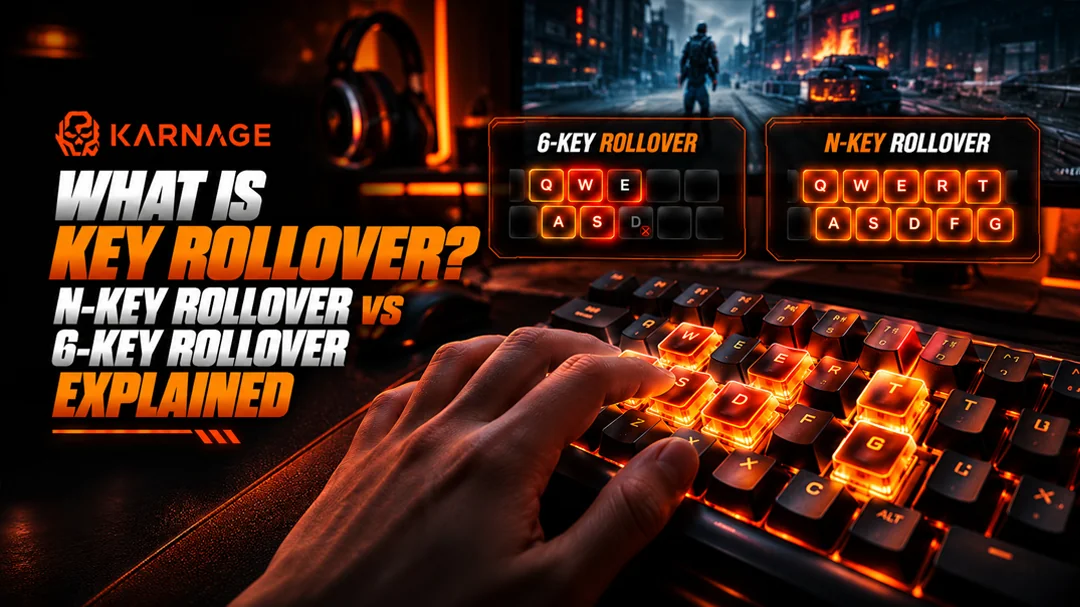
Have you ever pressed multiple keys simultaneously while gaming, only to find that one of your commands did not register? This can happen when your keyboard has limitations in how it detects and processes simultaneous keypresses. One important specification that helps explain this behaviour is key rollover.
Understanding what is N-key rollover and how it differs from 6-key rollover can help you choose a gaming keyboard that suits your playstyle. Whether you play competitive FPS games, multiplayer online games, racing titles, or action-packed adventures, reliable key registration can make your controls feel more consistent.
In this guide, we will explain key rollover, compare N-key rollover vs 6-key rollover and help you understand which keyboard feature matters most for gaming.
Table of Contents
- What Is Key Rollover?
- Why Is Key Rollover Important for Gaming?
- What Is N-Key Rollover?
- What Is 6-Key Rollover?
- N-Key Rollover vs 6-Key Rollover: Key Differences
- Which Is Better for Gaming: N-Key Rollover or 6-Key Rollover?
- How to Check Your Keyboard's Key Rollover
- How to Choose a Gaming Keyboard With the Right Rollover Support
- Frequently Asked Questions
- N-Key Rollover vs 6-Key Rollover – Conclusion
What Is Key Rollover?
Key rollover describes how many simultaneous keypresses a keyboard can correctly recognize and register. It is particularly relevant when several keys need to be held or pressed together during gameplay.
For example, a player might hold the W key to move forward, press Shift to sprint, hold Space to jump, and press another key to activate an ability. If the keyboard cannot register the required combination correctly, one or more inputs may be missed.
Different keyboards support different levels of simultaneous key registration. Some basic models have limitations with certain combinations, while gaming keyboards may provide 6-key rollover or N-key rollover.
Why Is Key Rollover Important for Gaming?
Many games require multiple inputs at the same time. First-person shooters, fighting games, rhythm games, and titles with complex controls can all benefit from reliable simultaneous key registration.
A gaming keyboard with suitable rollover support can help ensure that the required inputs are recognized when multiple keys are pressed together. However, key rollover is only one aspect of gaming performance. Switch quality, input latency, keyboard firmware, and the specific key combination being used can also affect the overall experience.
What Is N-Key Rollover?
N-key rollover, commonly abbreviated as NKRO, is a keyboard feature that allows multiple keys to be registered simultaneously, up to the keyboard's supported capacity.
In the term N-key rollover, the letter N represents the number of keys that can be recognized together. With full N-key rollover, the keyboard is designed to register all keys simultaneously, subject to its hardware, firmware, and connection implementation.
For example, a gamer could hold several movement keys, activate sprint, jump, and press additional controls without exceeding an advertised six-key limit.
How Does N-Key Rollover Work?
Keyboard circuits use a matrix of rows and columns to detect keypresses. The keyboard's circuitry and firmware determine how multiple simultaneous inputs are identified.
With suitable circuit design and key detection logic, a keyboard can distinguish many simultaneous keypresses without incorrectly interpreting the combination.
Some keyboards use diode-based circuits to help prevent unwanted electrical paths between keys. The implementation varies between models, so the actual specifications should always be checked.
Benefits of N-Key Rollover
- Multiple simultaneous inputs: Supports complex combinations of keys.
- Useful for competitive games: Helps with movement, jumping, sprinting, and ability combinations.
- Suitable for complex controls: Can benefit games that use many keys simultaneously.
- More flexibility: Reduces the likelihood of hitting a rollover limit during demanding combinations.
It is worth noting that N-key rollover does not automatically make a keyboard faster. It primarily describes simultaneous key registration rather than the speed at which each individual keypress is processed.
What Is 6-Key Rollover?
6-key rollover, often written as 6KRO, allows a keyboard to register up to six qualifying simultaneous keypresses, generally alongside certain modifier keys such as Ctrl, Alt, and Shift, depending on the keyboard's implementation.
For many everyday users and gamers, this is sufficient. Typical gaming combinations may involve movement, jumping, sprinting, and one or two additional controls.
However, the precise behaviour of modifier keys and other simultaneous inputs depends on the product specifications. A keyboard advertised as 6KRO may have additional implementation details that affect how particular combinations work.
Benefits of 6-Key Rollover
- Suitable for many gaming situations: Most common combinations may fit within the supported limit.
- Reliable everyday use: Works well for normal typing and general computer tasks.
- Practical functionality: Can provide adequate simultaneous input support without requiring full NKRO.
- Budget-friendly options: Some affordable keyboards offer 6KRO or similar rollover capabilities.
If you mainly play casual games or use standard movement controls, 6KRO may meet your needs. If you frequently press many keys simultaneously, a keyboard with full NKRO may offer greater flexibility.
N-Key Rollover vs 6-Key Rollover: Key Differences
When comparing N-key rollover vs 6-key rollover, the main distinction is the number of simultaneous keypresses that can be registered.
| Feature | N-Key Rollover | 6-Key Rollover |
|---|---|---|
| Simultaneous key registration | Multiple keys, up to the supported capacity; full NKRO is designed for all keys | Up to six qualifying keypresses |
| Complex key combinations | Offers greater flexibility | May reach its rollover limit |
| Competitive gaming | Useful for demanding simultaneous inputs | Sufficient for many common combinations |
| Everyday typing | More than adequate | More than adequate |
| Compatibility | Depends on keyboard and connection implementation | Depends on keyboard and connection implementation |
| Key priority | Broad simultaneous input support | Limited by the specified rollover capacity |
The best option depends on how many keys you typically use simultaneously. A well-designed 6KRO keyboard may be perfectly suitable for many players, while NKRO can be beneficial for users who want fewer limitations on simultaneous inputs.
Which Is Better for Gaming: N-Key Rollover or 6-Key Rollover?
Neither option is automatically better for every gamer. The right choice depends on your games, key combinations, and keyboard requirements.
For FPS Games
FPS games often use movement keys, sprint, jump, crouch, reload, and other controls in quick combinations. A keyboard with reliable rollover support helps ensure that simultaneous inputs are registered correctly.
Both 6KRO and NKRO can work well, but NKRO offers more flexibility if your preferred combinations exceed the six-key limit.
For Fighting and Rhythm Games
Some fighting and rhythm games involve rapid combinations or several simultaneous inputs. A suitable rollover implementation can help reduce missed inputs when multiple keys are pressed together.
However, layout, switch feel, and the game's input handling also matter.
For Everyday Use and Casual Gaming
If you mostly type, browse the web, and play games with relatively simple controls, 6KRO may be sufficient. Full NKRO can still be useful, but it may not provide a noticeable advantage in every situation.
How to Check Your Keyboard's Key Rollover
You can check your keyboard's rollover support in a few ways:
- Check the product specifications: Look for terms such as 6KRO, NKRO, full N-key rollover, and anti-ghosting.
- Consult the manufacturer's documentation: Confirm whether the specification applies to all keys or selected combinations.
- Use a keyboard testing tool: A reputable online keyboard tester can show which keys are detected when pressed together. Avoid entering passwords or sensitive information into testing websites.
- Test your usual gaming combinations: Press the movement and action keys you commonly use and check whether all intended inputs register.
- Check connection modes: Some keyboards behave differently depending on their connection or operating mode, so consult the manufacturer's guidance.
A browser-based test can help identify certain limitations, but it may not accurately measure every possible combination. Keyboard firmware, operating-system behaviour, and the browser itself can affect the results.
How to Choose a Gaming Keyboard With the Right Rollover Support
Before purchasing a gaming keyboard, consider these factors:
- Your Gaming Requirements: Think about the number of keys you typically press simultaneously. For standard movement and action controls, 6KRO may be enough. If you use more complex combinations, consider full NKRO.
- Switch Type and Typing Feel: Mechanical keyboards offer a range of linear, tactile, and clicky switches. Membrane keyboards can also provide suitable rollover support. Rollover capability depends on the keyboard's design, not simply whether it uses mechanical or membrane switches.
- Build Quality and Connectivity: Look at the keyboard's construction, connection type, firmware, and manufacturer specifications. These factors can influence usability and input reliability.
- Additional Gaming Features: Features such as programmable keys, dedicated gaming modes, customizable lighting, and software support may improve convenience, depending on your preferences. When comparing gaming keyboards on Karnage.in, review the specifications carefully and choose a model that meets your gaming requirements rather than relying on a single feature.
Frequently Asked Questions
1. What is N-key rollover?
N-key rollover is a keyboard feature that allows multiple keys to be registered simultaneously, up to the keyboard's supported capacity. Full NKRO is designed to support simultaneous registration of all keys.
2. What is the difference between N-key rollover and 6-key rollover?
N-key rollover offers simultaneous key registration up to the keyboard's supported capacity, while 6-key rollover supports up to six qualifying simultaneous keypresses. The exact handling of modifier keys depends on the implementation.
3. Is 6-key rollover enough for gaming?
For many games, yes. Six-key rollover can handle common combinations of movement and action keys. Players who use more complex simultaneous inputs may benefit from full NKRO.
4. Does N-key rollover improve gaming performance?
N-key rollover can help prevent missed inputs when many keys are pressed simultaneously. However, it does not automatically improve response speed, aim, or overall gaming performance.
5. Do mechanical keyboards always have N-key rollover?
No. Mechanical construction does not guarantee NKRO. Always check the specific keyboard's specifications and supported connection modes.
6. Can I test whether my keyboard supports N-key rollover?
Yes. You can consult the manufacturer's documentation and use a reputable keyboard testing tool to check simultaneous key registration. Test the combinations you use most frequently, while remembering that browser-based tests have limitations.
N-Key Rollover vs 6-Key Rollover – Conclusion
When choosing between N-key rollover vs 6-key rollover, consider how you use your keyboard rather than assuming that one specification is essential for everyone. A 6-key rollover keyboard can be sufficient for everyday computing and many gaming situations. Full N-key rollover offers greater flexibility for complex simultaneous key combinations and can be useful for competitive players who want to minimize rollover limitations.
Before purchasing a gaming keyboard, verify its actual rollover support, check anti-ghosting claims, and consider the other features that matter to your setup.