.webp)
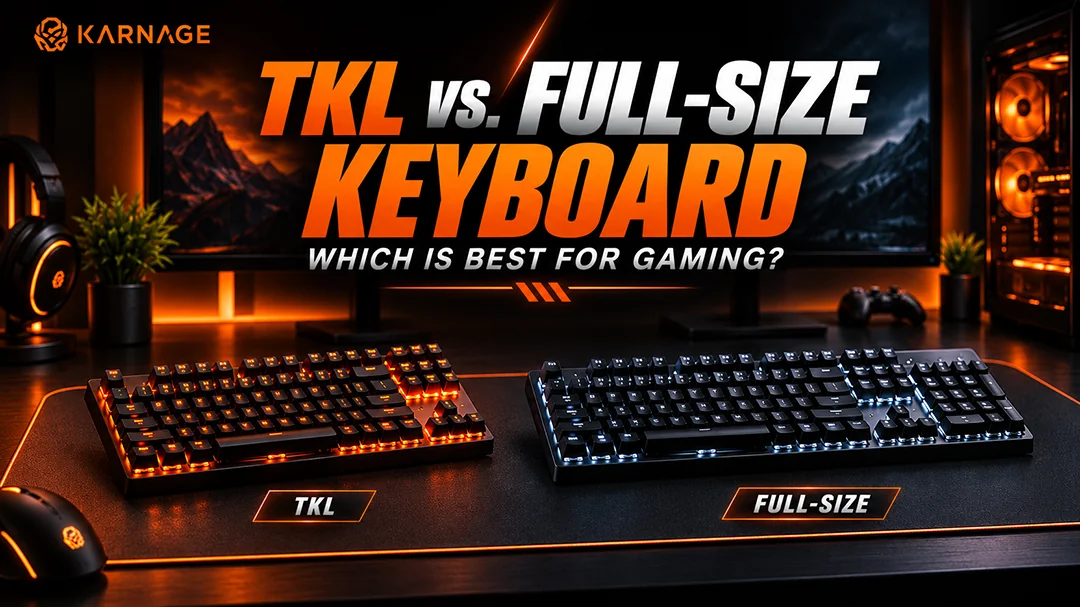
Choosing the right keyboard layout can make a noticeable difference to your gaming experience, desk space, and everyday productivity. While some gamers prefer a compact keyboard that leaves more room for mouse movement, others want a dedicated number pad for work, calculations, and shortcuts. This is where the comparison between a TKL keyboard and a full-size keyboard becomes important.
A TKL keyboard removes the dedicated number pad found on traditional full-size layouts while retaining the main typing keys, function row, and navigation keys. A full size keyboard includes the complete layout, including the number pad, making it suitable for users who need additional keys for everyday tasks.
But which layout should you choose? In this guide, we will explain the TKL keyboard meaning, compare a TKL mechanical keyboard with a full size keyboard, and explore the advantages, disadvantages, and ideal use cases of each layout.
Table of Contents
- What Is a TKL Keyboard?
- What Is a Full-Size Keyboard?
- TKL vs. Full-Size Keyboard: Key Differences
- Benefits of a TKL Keyboard for Gaming
- Benefits of a Full-Size Keyboard
- TKL Mechanical Keyboard vs Full-Size Mechanical Keyboard
- Which Keyboard Layout Is Better for FPS Gaming?
- How to Choose the Right Keyboard Layout
- Final Verdict: TKL Keyboard or Full-Size Keyboard?
- Frequently Asked Questions
What Is a TKL Keyboard?
TKL stands for Tenkeyless. A TKL keyboard is a keyboard layout that removes the dedicated numeric keypad, commonly known as the number pad, from the right side of a standard full-size keyboard.
Most TKL layouts retain the main alphanumeric keys, function row, arrow keys, and navigation cluster. This gives users a more compact keyboard without sacrificing most of the keys required for everyday typing and gaming.
TKL Keyboard Meaning Explained
The TKL keyboard meaning comes from the removal of the ten-key numeric keypad. Although the exact number of keys varies by model, many standard TKL keyboards have approximately 87 keys in the US ANSI layout, compared with around 104 or 105 keys on a full-size keyboard.
A TKL keyboard is popular among gamers because it occupies less horizontal desk space. This allows users to position their mouse more comfortably, particularly when playing games that require broad mouse movements.
What Is a TKL Mechanical Keyboard?
A TKL mechanical keyboard combines the tenkeyless layout with individual mechanical switches beneath its keys. These switches can offer different typing experiences, including linear, tactile, and clicky feedback.
A TKL mechanical keyboard can be useful for gamers who want a compact layout while retaining the switch options and customization features available on mechanical keyboards.
However, TKL describes the layout, not the switch mechanism. TKL keyboards can also use membrane or other switch technologies.
What Is a Full-Size Keyboard?
A full size wireless gaming keyboard is the traditional keyboard layout that includes the main typing section, function row, navigation keys, arrow keys, and a dedicated numeric keypad on the right.
The number pad is particularly useful for entering numbers quickly, working with spreadsheets, managing financial data, and using applications that rely on numeric input.
Key Features of a Full-Size Keyboard
- Dedicated number pad: Convenient for calculations and numerical data entry.
- Complete layout: Includes the main typing section, function row, navigation keys, and numeric keypad.
- Productivity benefits: Useful for office work, accounting, spreadsheets, and data-heavy applications.
- Gaming functionality: Provides the full standard key layout for users who prefer having every key cluster available.
- Wider design: Typically requires more horizontal desk space than a TKL keyboard.
A full size keyboard is a practical option for users who regularly switch between gaming and productivity tasks.
TKL vs. Full-Size Keyboard: Key Differences
When comparing a TKL keyboard with a full size keyboard, the biggest difference is the dedicated number pad. This affects the overall width, available desk space, and convenience for certain tasks.
| Feature | TKL Keyboard | Full-Size Keyboard |
|---|---|---|
| Numeric keypad | Not included | Included |
| Desk space | Requires less horizontal space | Requires more horizontal space |
| Mouse positioning | More room for mouse placement | May limit available mouse space |
| Number-heavy tasks | Requires the number row or a separate numpad | Dedicated number pad available |
| Gaming | Useful for compact setups | Useful for players who want a complete layout |
| Portability | Often easier to transport | Generally larger |
| Key count | Commonly around 87 keys in ANSI layouts | Commonly around 104–105 keys in ANSI layouts |
| Best suited for | Gaming-focused and space-conscious setups | Gaming, office work, and numerical input |
The right choice depends on your priorities. A TKL layout can improve desk flexibility, while a full size keyboard offers additional convenience for number-heavy tasks.
Benefits of a TKL Keyboard for Gaming
A TKL keyboard can be an excellent choice for gamers who want more space and flexibility on their desk.
1. More Room for Mouse Movement
FPS games often require players to move their mouse over a wide area, especially when using lower sensitivity settings. Removing the number pad gives the mouse more room on the right side of the keyboard.
This is one reason a TKL keyboard is popular among competitive gamers. It allows the keyboard and mouse to be positioned closer to a comfortable shoulder-width arrangement.
2. A More Compact Desk Setup
A smaller keyboard can help keep a gaming desk organized. It leaves additional space for a mousepad, headset stand, controller, or other accessories.
A TKL mechanical keyboard can be especially appealing to gamers who want mechanical switches without the extra width of a number pad.
3. Easier Transportation
If you regularly attend gaming events, LAN parties, or tournaments, a tenkeyless keyboard may be easier to pack and carry than a full-size model.
The actual portability depends on the keyboard's weight, construction, cable design, and case dimensions.
4. Most Essential Gaming Keys Remain Available
A standard TKL layout retains the main typing keys, function row, arrow keys, and navigation cluster. Most games can be played without a dedicated number pad, although certain games and custom control schemes may rely on those keys.
For many gaming-focused users, this makes the TKL layout a practical balance between functionality and compactness.
Benefits of a Full-Size Keyboard
Although compact layouts are popular, a full size keyboard remains useful for many gamers and professionals.
1. Dedicated Numeric Keypad
The most obvious advantage is the number pad. Users who work with spreadsheets, calculations, accounting software, or numerical data can enter numbers efficiently without relying on the top number row.
2. More Keys for Shortcuts
Some applications and games use the numeric keypad for shortcuts, commands, or custom key bindings. A full size keyboard provides these additional keys without requiring a separate accessory.
3. Better for Gaming and Productivity Combined
If you use one computer for work and gaming, a full-size layout may offer greater convenience throughout the day.
You can handle office tasks, enter numerical data, and play games without changing keyboards or attaching an external number pad.
4. Familiar Traditional Layout
Users who have always worked with a standard keyboard may prefer the familiar arrangement of a full size keyboard. The additional width can be worthwhile if the number pad is used frequently.
TKL Mechanical Keyboard vs Full-Size Mechanical Keyboard
If you have decided to buy a mechanical keyboard, the layout becomes another important consideration.
A TKL mechanical keyboard offers a compact footprint while retaining the core keys used for typing and gaming. It can be useful for gamers who prefer additional mouse space and want to customize their switch type or keycaps.
A full-size mechanical keyboard combines mechanical switches with the complete traditional layout. It provides a dedicated number pad, which can be useful for work, shortcuts, and games that rely on numerical controls.
Remember that layout and switch type are separate decisions. Both TKL and full-size keyboards can offer different switch mechanisms, RGB lighting, anti-ghosting, programmable functions, and varying levels of customization.
Before buying either option, compare the actual specifications rather than assuming that a particular layout automatically offers better performance.
Which Keyboard Layout Is Better for FPS Gaming?
For FPS games, mouse positioning and desk space can be particularly important. Players who use lower mouse sensitivity may benefit from the additional space available with a TKL keyboard.
A compact layout can make it easier to position the keyboard at an angle while keeping the mouse within comfortable reach. However, the benefit depends on desk dimensions, mousepad size, arm position, and personal preference.
A full size keyboard can still work well for FPS gaming, especially if your desk provides enough room for comfortable mouse movement.
How to Choose the Right Keyboard Layout
Before making your decision, consider these factors:
- Evaluate Your Desk Space: Measure the available space for your keyboard and mousepad. A TKL layout may be helpful if your desk is narrow or your mouse frequently collides with the keyboard.
- Consider Your Daily Tasks: Think about how often you use the number pad. If you frequently enter numerical data, a full size keyboard can save time and effort.
- Check Your Gaming Preferences: Consider the games you play and the key bindings you use. Most games do not require a number pad, but some players rely on it for custom controls.
- Choose Your Switch Type: If you prefer a mechanical keyboard, compare linear, tactile, and clicky switches. The right choice depends on typing feel, noise preference, and gaming requirements rather than layout alone.
- Review Additional Features: Compare build quality, key rollover, anti-ghosting, connectivity, RGB lighting, and software support. These features can vary between models regardless of whether the keyboard is TKL or full-size.
Final Verdict: TKL Keyboard or Full-Size Keyboard?
The choice between a TKL keyboard and a full size keyboard comes down to your gaming style, desk space, and everyday requirements. A TKL keyboard is a strong option for gamers who want a compact setup and more room for mouse movement. A TKL mechanical keyboard can be especially appealing if you want mechanical switches in a smaller layout.
A full size keyboard remains a practical choice for users who regularly enter numbers, work with spreadsheets, or rely on the dedicated number pad for shortcuts. Before making your decision, consider how you use your keyboard throughout the day and which features matter most to you.
Frequently Asked Questions
1. What is the TKL keyboard meaning?
TKL means Tenkeyless. It describes a keyboard layout that removes the dedicated numeric keypad while retaining most of the standard typing and navigation keys.
2. Is a TKL keyboard better than a full size keyboard for gaming?
A TKL keyboard can be useful for gaming because it takes up less desk space and allows more flexibility in mouse positioning. A full size keyboard is better suited to users who regularly need a number pad. Neither layout guarantees better gaming performance.
3. What is the difference between a TKL mechanical keyboard and a regular mechanical keyboard?
A TKL mechanical keyboard uses a tenkeyless layout without a dedicated number pad. A regular full-size mechanical keyboard includes the number pad. Both can use mechanical switches, and the main difference is their layout and width.
4. Does a full size keyboard improve typing productivity?
A full size keyboard can improve convenience for tasks involving frequent numerical input, spreadsheets, or accounting. For general writing and everyday typing, a TKL layout may provide all the keys you need.
5. Can I use a TKL keyboard for office work?
Yes. A TKL keyboard retains the main typing keys, function row, arrow keys, and navigation keys. If you rarely use a numeric keypad, it can work well for office tasks.
6. Is a TKL keyboard easier to carry?
It is often easier to transport because it is generally narrower than a full size keyboard. However, portability also depends on weight, thickness, and construction.
7. Should I buy a TKL keyboard or a full size keyboard?
Choose a TKL keyboard if you prioritize desk space, mouse movement, and a compact setup. Choose a full size keyboard if you need a dedicated number pad or prefer the traditional layout for both work and gaming.
8. Can a TKL keyboard have RGB lighting and anti-ghosting?
Yes. Many TKL keyboards offer RGB lighting, anti-ghosting, programmable functions, and other gaming features. Availability depends on the individual model, so check its specifications before purchasing.